

For decades, the Mobile Data Terminal (MDT)- or Mobile Data Computer (MDC)- has been the default way to bring CAD information into the cab. It works, but it was largely built as an extension of the communications center: functional, text-heavy, and optimized for dispatch workflows more than responder workflows.
Tablet Command approaches the problem from the opposite direction: start with what responders and incident commanders need in the field, then integrate tightly with CAD so status, assignments, and incident updates remain accurate and in sync.
How Tablet Command Evolved into an MDT Replacement
Tablet Command began as a stand-alone incident command application. The earliest focus was accountability and real-time operational visibility on the incident scene.
The first major step was CAD integration- bringing incidents, assignments, and updates from CAD into Tablet Command so companies and command staff could operate off the same live picture dispatch was seeing. That integration immediately improved situational awareness and reduced the “radio relay” burden during fast-moving incidents.
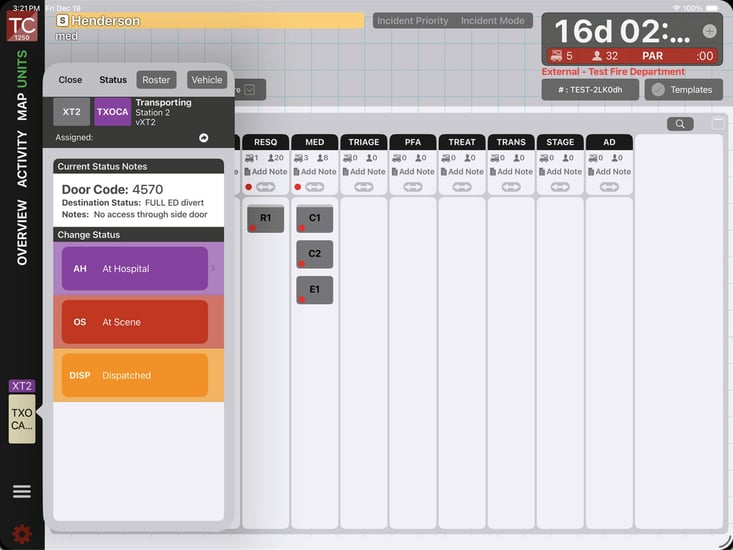
Then customers asked for the next logical step: replace the status and 2-way CAD interactions traditionally handled on the MDT. Tablet Command added a status button and two-way functionality back to CAD- enabling units to update their status from a responder-first mobile interface.
Since then, many agencies have adopted Tablet Command not just as an incident command tool, but as an MDT replacement that unifies response + command in one platform.
CAD Is the System of Record- But the MDT Hasn’t Been Built for Responders
CAD should remain the authority for:
- Resource status
- Unit recommendations (closest/most appropriate)
- Incident creation and core dispatch workflow
But traditional MDTs have typically been designed around what CAD needs from the field (status updates, acknowledgements, basic messaging), not around how responders actually operate while rolling out the door, arriving, and transitioning into command.
Tablet Command is built to be responder-focused- bringing CAD information into a modern mobile experience while also delivering the additional tools responders rely on today, such as:
- Live, customized maps that update continuously and support multiple data sources, including supporting off-line maps for lack of connectivity
- Quick access to drone video and other operational video feeds
- Staffing visibility across agencies, so you can see who is riding what unit while responding or managing an incident
- A mobile UI designed with firefighters, for firefighters- fast, touch-friendly, and field-ready
Why Departments Are Choosing iPads
Many agencies are reevaluating the cost and complexity of legacy ruggedized laptops. Refresh cycles are expensive, mounting is complex, and the user experience often feels dated.
iPads have changed the equation:
- Lower hardware cost (including refresh) compared to ruggedized laptops
- A truly mobile, intuitive interface that responders already know how to use
- Strong security and manageability through modern mobile device management (MDM) ecosystems
- A platform that supports rapid improvement and frequent updates without the “big-bang” upgrade pain
For many departments, moving to iPads isn’t just about hardware savings- it’s about finally giving responders a field interface that feels modern, fast, and purpose-built.
“Critics Exist” - And the Perspective Matters
It’s normal for any MDT replacement conversation to bring strong opinions- especially from teams who’ve invested significant time into legacy systems.
IT and communications absolutely need a seat at the table because the solution must integrate cleanly, meet security requirements, and support dispatch operations. But it’s also important to recognize a simple truth:
Operations leaders choose the tools their responders use in the field.
We don’t ask the water department to pick our nozzles. We shouldn’t ask non-operations stakeholders to unilaterally decide what field interface is best for responders.
Mobile-first solutions are meaningfully different from legacy text-based MDT workflows. When evaluating options, keep the responder experience front and center- because that’s where seconds, clarity, and usability matter most.
What Tablet Command Replaces (and What It Doesn’t- Yet)
Tablet Command replaces the core MDT functions most agencies rely on daily, including two-way status and responder-facing CAD workflows.
That said, some agencies also want deeper “mobile CAD” features that may exist in certain legacy MDT systems, such as:
- Searching historical incidents by advanced criteria
- Looking up detailed, address-specific hazard notes
- Specialized CAD query functions that vary widely by vendor and configuration
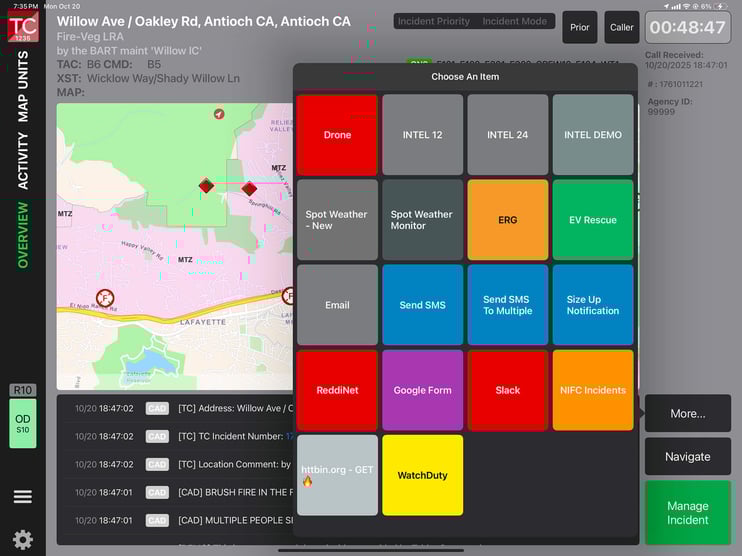
When those needs arise, Tablet Command is open to conversations about adding agency-specific functionality- often through configurable buttons and workflows, similar to custom implementations we’ve delivered with agencies like Orange County Fire Authority.
Field Solutions That Are Easier to Update
One of the most overlooked problems with traditional mobile CAD/MDT solutions is how hard they can be to keep current. . . especially maps and operational layers.
Tablet Command makes field updates practical:
- Esri ArcGIS Online customised mapping can be incorporated and refreshed without a heavy lift
- Custom buttons and workflows can be configured through Tablet Command administration and implemented through a straightforward support request process
That means your field experience evolves with your operations—not with your next hardware refresh cycle.
A Real-World Example: OCFA and Acknowledgements
In September 2023, Tablet Command was awarded the Orange County Fire Authority Mobile Computer Assisted Dispatch Program, following an RFP process that began earlier in the year.
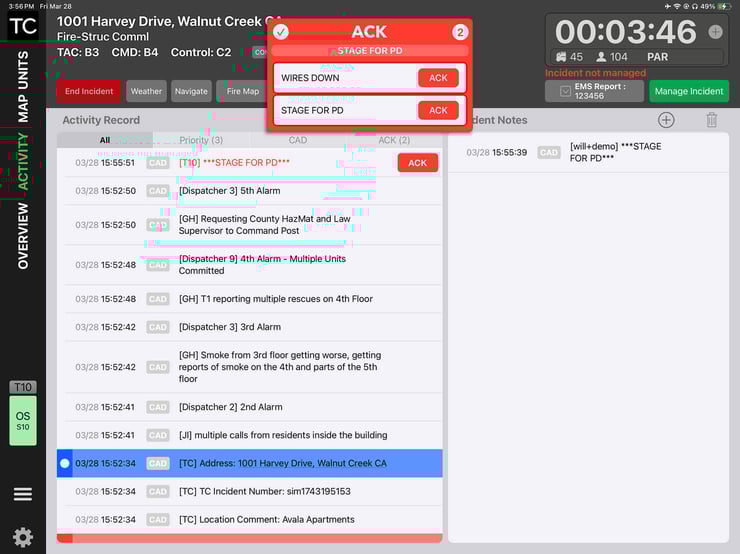
A key requirement involved acknowledgement workflows. OCFA’s team had built acknowledgement functions that were referenced in the RFP. Tablet Command recognised the operational need- but proposed an approach designed to be more flexible for real-world dispatching.
Traditional acknowledgement buttons can be limited because they typically support only a fixed set of canned acknowledgements. Real incidents don’t always cooperate with fixed messages.
Tablet Command built functionality that works with CentralSquare CAD (and can be adapted for other CAD providers), allowing dispatchers to:
- Flag specific text in incident comments using a simple convention (for example, ***)
- Trigger acknowledgement requirements for units in the field
- Support both canned acknowledgements and dynamic, dispatcher-created messages
This turns acknowledgement into an operational tool- not just a checkbox.
The Bigger Point: Mobile Field Experience Hasn’t Been the Priority
Historically, MDTs have been treated as an extension of CAD- a window into dispatch, not a platform for response.
And when CAD providers build mobile solutions, fire-service-tailored responder experience is not always the top priority- because their core business is the communications center workflow. Tablet Command exists to close that gap: maintain CAD as the system of record while delivering a field-first, incident-command-ready, continuously improving mobile experience.
Want to see how agencies are using Tablet Command in the field?
Schedule a demo and we’ll walk you through how it works. See why Tablet Command is trusted by thousands of departments across North America.