
Release Date: November 9, 2026
We’re proud to announce the release of Tablet Command 4.4, an update that includes several enhancements designed to help emergency responders work more efficiently, collaborate more effectively, and access important information when they need it most.
This release features five key updates across Tablet Command, Tablet Command Mobile, and Tablet Command Web:
- Redesigned UI
- Shared Incident Notes
- Expanded Kind & Type of Resource
- AVL Drone Location Layer
- Watch Duty Fire Map Layer
Redesigned UI
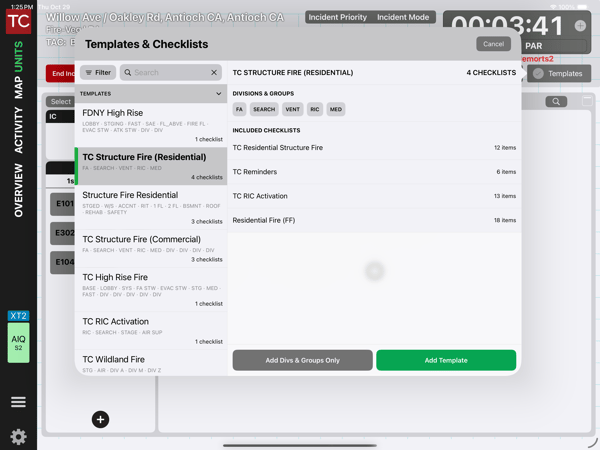
This update includes a redesigned UI to support better functionality and navigation. Users can now search templates by name, filter them by agency, and preview their contents before adding them to an incident. Within checklists, progress indicators make it easier to see remaining tasks at a glance, while completed tasks can be moved to the bottom for a cleaner, more organized view. Also, users may add additional checklists without adding a full template.
Shared Incident Notes
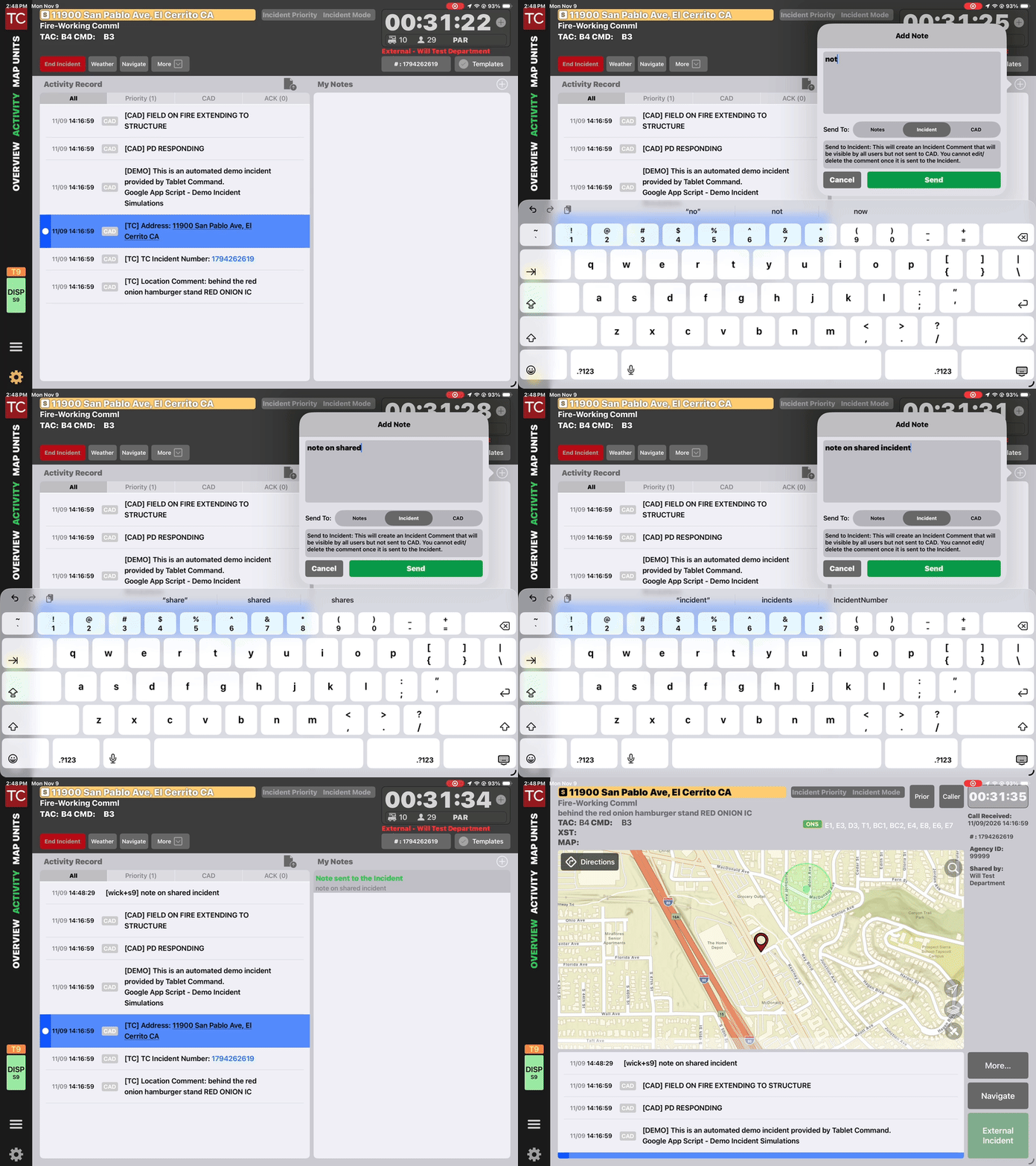
Users working within a shared incident can now add notes directly through the Activities view under My Notes. Once submitted, notes become part of the incident's activity record and identify the individual who added them.
Expanded Kind & Type of Resource
Understanding which resources are responding to an incident is essential for effective incident management. With expanded Resource Kind and Type support, Tablet Command now displays additional configured classifications within resource details.
AVL Drone Location Layer
Currently available to Skydio customers with additional drone manufacturer integrations to follow, users can toggle the layer on or off to view their agency's drone locations directly on the map, which brings additional aerial resource awareness into the incident environment. This provides incident commanders with another layer of geographic context when monitoring resources and managing operations.
Watch Duty Fire Map Layer
Finally, Tablet Command 4.4 brings Watch Duty fire locations directly into the incident map. Fires are displayed using Watch Duty's recognizable flame icon, allowing users to see additional fire activity alongside existing incident information and map content. This provides valuable geographic context for personnel monitoring fire activity and managing incidents. The Watch Duty layer is always visible when available and does not currently include an on/off toggle.
Additional Improvements Behind the Scenes
Genasys evacuation zones now use the latest Feature Service for improved reliability and responsiveness. TC Mobile also adds satellite support for personnel location tracking, along with a Siri Shortcut to toggle duty status. Satellite tracking requires supported T-Mobile connectivity, and other data does not sync while in satellite mode.
Additional bug fixes and performance enhancements are also included.
Questions? Please contact support@tabletcommand.com and we’d be happy to assist you.